


Interaction Archive Player ©
New Release: Genesys Cloud Screen Recording Viewer
Version 2.0 | Released October 2025
Transform Your Recording Experience
Experience seamless integration of audio and video in a powerful, intuitive interface designed specifically for contact center quality management and training.
Our new Recording Studio provides a complete solution for reviewing agent-customer interactions with precision controls and advanced features that save time and improve analysis quality.
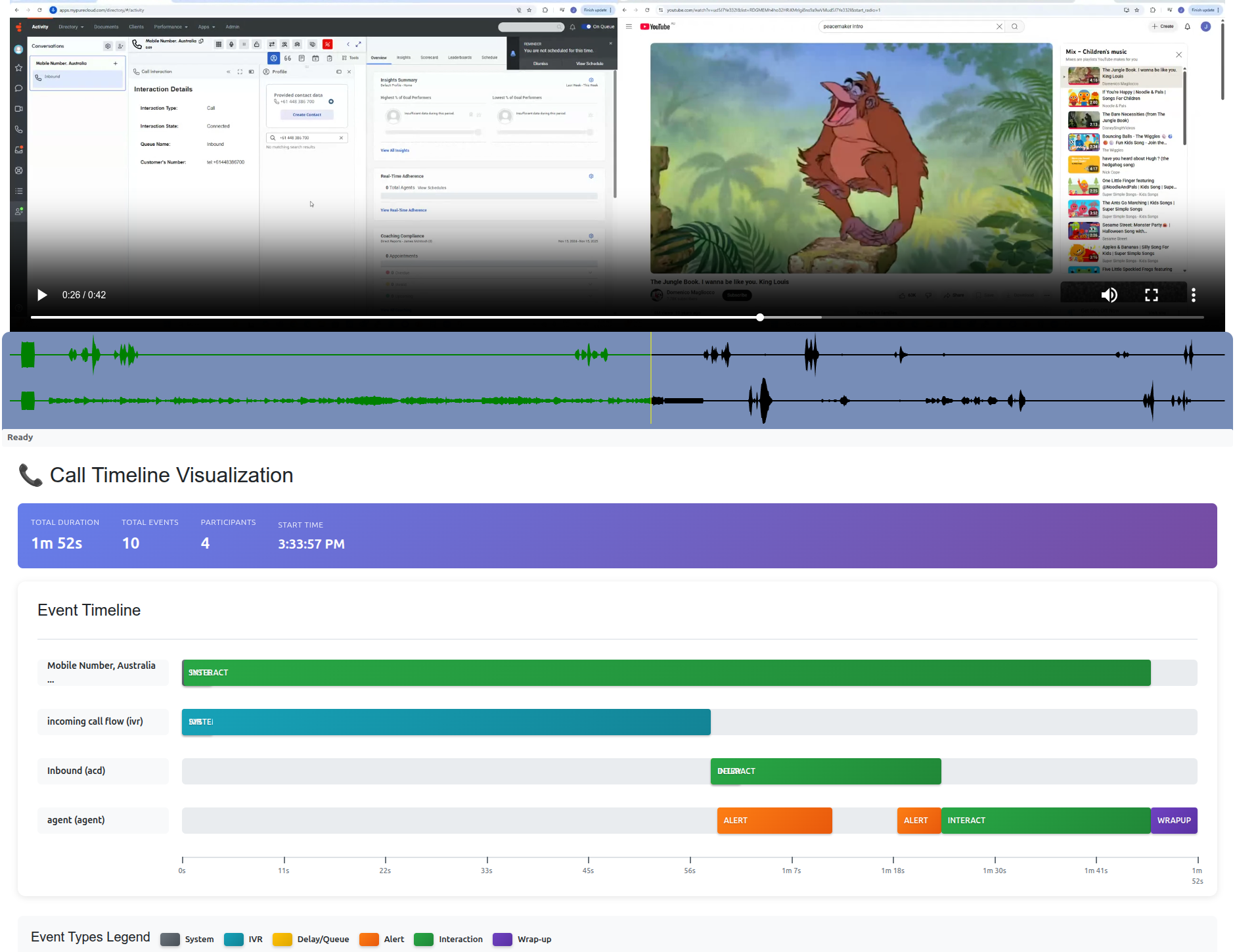
Save selected segments of the interaction
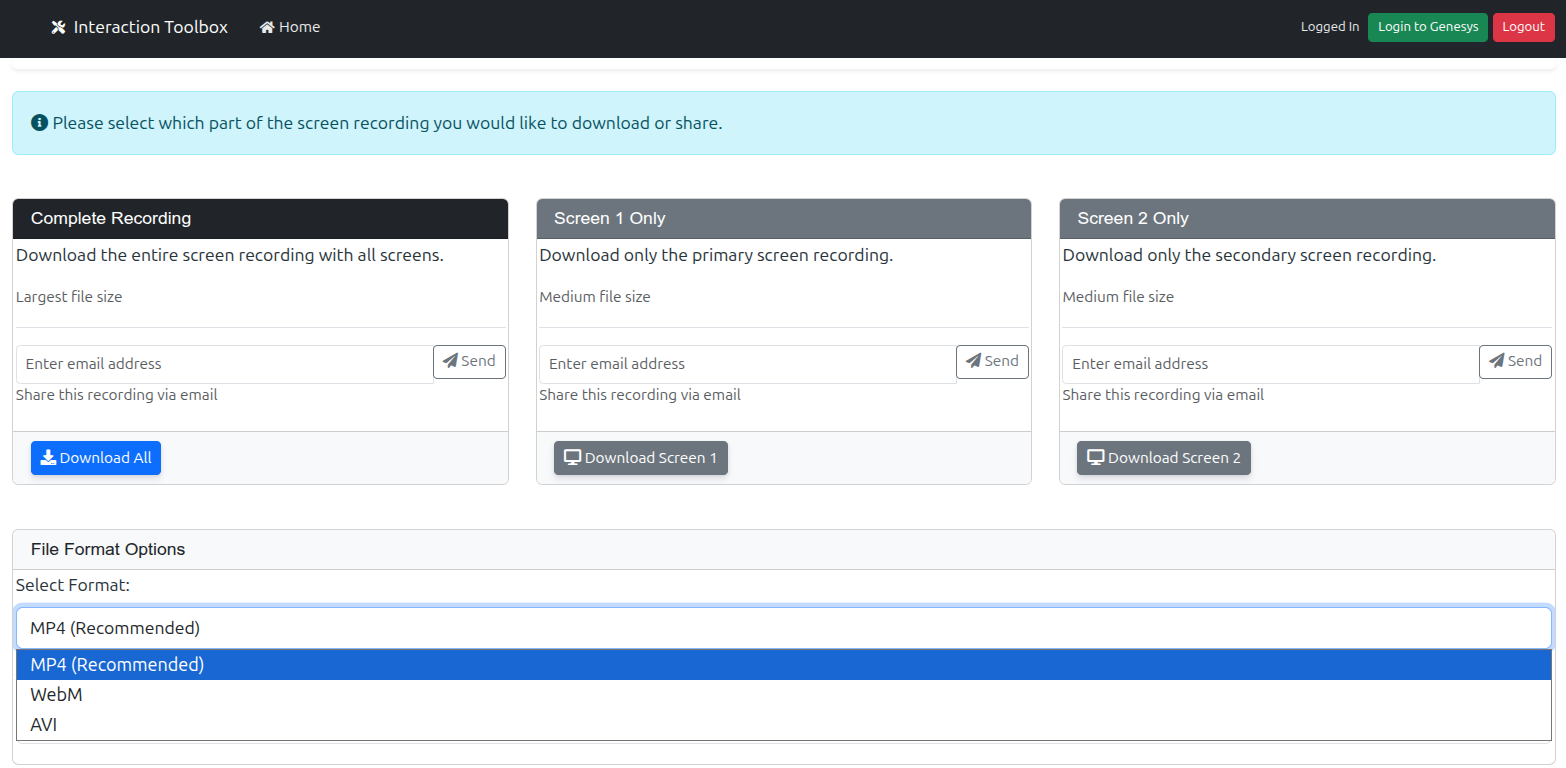
Actual interface of the new Recording Studio
Advanced Data Portability
Universal export capabilities designed for compliance, analytics, and long-term data sovereignty.
Hybrid Cloud Support
Seamlessly export to Local storage, AWS S3, or Azure buckets. Maintain full control over where your critical business data resides.
Seamless Decryption
Automatically decrypt encrypted interactions on-the-fly during export. Ready for immediate use in speech analytics or legal review.
Logical Hierarchy
Exported data is automatically organized into intuitive Year/Month/Day folder structures for instant retrieval and organization.
Key Features
Perfect Synchronization
Audio and video perfectly synchronized for accurate interaction review.
Perfect Synchronization
Audio and video perfectly synchronized for accurate interaction review, eliminating timing discrepancies.
Unified Display
All interaction elements consolidated on a single screen for efficient analysis.
Visual Audio Waveform
Interactive audio visualization allows precise navigation to key moments.
Channel Controls
Independent volume controls for agent and customer audio channels.
One-Click Export
Instantly download complete interactions as a single MP4 file.
Advanced Search
Powerful search capabilities to quickly find specific recordings.
Business Impact
- Save 30% review time with our streamlined interface and synchronized playback
- Improve training effectiveness by easily identifying and sharing key interaction moments
- Enhance quality management with precise audio-visual analysis tools
Ready to Get Started?
Experience the future of interaction review today!
Contact us for a
demonstration
Act Now to Preserve Critical Interaction Recordings
As platforms approach their end-of-life status, the risk of losing vital interaction recordings becomes an urgent concern. Essential for compliance and operational transparency, these records may become inaccessible if not retrieved in time.
Time is of the Essence
With platform support ending, data retrieval becomes increasingly complex and costly. Secure your data and protect your future today.
Interaction Archive Player
Universal access to your archived data across all Genesys platforms
Genesys Cloud CX ®
Keep your Genesys Cloud interactions stored locally. IAP ensures near-production-ready access to all your voice and screen recordings outside the cloud environment.
- Play voice & screen
- Export to S3 / Azure / Local
Genesys Engage ®
Whether using Premise (MLM) or Cloud (RCBS), IAP provides a consistent interface to search, play, and download interactions from your archives.
- Region-based filtering
- Access Group security
Genesys PureConnect ®
Complete export capabilities for PureConnect interactions to any storage location. Seamless search and playback functionality for both voice and screen recordings.
- Advanced Search
- Integrated Playback
Platform Migration Made Easy
Ensure business continuity during your transition
Migrating platforms shouldn't mean leaving your data behind. We ensure all interactions are securely archived and easily accessible.
At Interaction Solutions, we specialize in the planning, deployment, and execution of your archiving process. Our Interaction Archive Player (IAP) populates dedicated metadata tables for effortless search and playback of millions of records.
Supported Migration Paths
- PureConnect (CIC)
- Engage Premise (PEP)
- Engage Cloud (PEC)
- Genesys Cloud (GCx)
Core Capabilities
Designed for security, compliance, and usability
Data Sovereignty
Full control over your data location. Download interactions to local storage or your private cloud to comply with governance laws.
Division Separation
Enforce strict access controls. Users only access interactions within their assigned Division, ensuring data privacy across your organization.
Agent Segment Playback
Focus on what matters. Option to skip IVR/Queue time and start playback exactly when the agent joins the conversation.
Advanced Search Filters
Locate any interaction instantly with combining multiple criteria:
- Agent Name/ID
- Caller Number (ANI)
- Dialed Number (DNIS)
- Date & Time Range
- Call/Conversation ID
- Call Duration
- Access Group
- Play Encrypted Calls
Smart Grouping
Analyze trends by grouping your search results:
Business Unit/Line of Business Extraction Module
The Business Unit/Line of Business Extraction Module in the QM Module (Engage Premise/Cloud) enables customers to organize archived interactions into specific business units.
Simply create new business units and then assign the appropriate Access Groups using an intuitive drag-and-drop interface. File sizes are dynamically calculated upon assignment, providing insights into the combined file sizes required for exporting the Business Unit.
Business Units serve as the repository for individual segments within an organization.
Line of Business Analytics Extract
Utilizing the Business Units module, a subset of interactions can be efficiently exported.
- Select the required Business Unit/Line of Business.
- Select a Date Range.
- Choose Selection Criteria: A random set of {x} calls or a percentage.
- Select Destination: Local storage or Cloud storage.
- Process...
The output is sorted by:
- Business Unit/Line of Business
- Year
- Month
- Day
Encrypted calls will be decrypted before export.
Requires 'Export' privileges.
IAP Features
Explore the many features offered by IAP:
- Search, play, and export archived interactions.
- Play encrypted interactions.
- Create notations for each interaction.
- Regional separation Learn More
- Attached Data Search Learn More
- Play screen recordings.
Regions
Genesys MultiCloud® interactions can be segmented by region. Especially for multi-site customers, this becomes vital to allow segmentation of interactions where they require each region to only have access to their own recordings. Each region may also require their own specific encryption file. IAP offers a setable option, at the user level, where each user can be limited to their own specific region, or alternatively, allow them to view interactions for all regions.
Attached Data Search
Genesys MultiCloud® CX interactions can contain attached data in the form of key/value pairs. This information can contain various pieces of important information such as:
- Customer Contact ID
- Account Number
- Product Types
- Business Result
- Various pieces of queueing information
- Etc...
IAP allows users to search by these key/value pairs. The returned result will contain all interactions which match the criteria, within the selected date/time range.
Flexible Data Retention Rules
Configure multiple levels of data retention using the following hierarchy:
- Region: For multi-region deployments, each region can have its own retention plan.
- Virtual Queue: Each virtual queue can have its own retention plan.
- Business Units: Each business unit, assigned various access groups, can have its own retention plan.
- Access Groups: Each individual access group can have its own specific retention plan.
It is possible to set a region to retain all interactions for a specific time period (e.g., 7 years). However, there may be interactions within that region handled by a specific virtual queue, which only need to be held for 5 years. Additionally, within that region, there may be business units that only need to retain their interactions for 2 years. Furthermore, within that business unit, some access groups may only need their interactions retained for 90 days.
By setting retention policies at various levels, overall control of interaction retention can be achieved from a macro to micro level.
Interaction Player
Screen shot examples

Frequently Asked Questions
Questions asked by customers related to deploying IAP
-
Can IAP
play
my
encrypted calls ?
Yes, Calls recorded with Genesys Interaction Recording (GIR) can be either saved as encrypted or non encrypted. IAP will know if the call is encrypted or not during its main processServer activity. If the call is encrypted, when it is requested to be played, IAP will fetch the original encryption key and use this to unencrypt the interaction.
-
Can
I have my archive in my own cloud environment ?
Yes, IAP can be hosted in a cloud environment. As long as it has access to the storage where the interactions have been saved then it will be able to play them.
-
I
have agents in different regions, I only want them to see their own regional
interactions
By setting a user permission within IAP you can limit them to searching and playing interactions only from their own regions.
-
We
have multiple Genesys Cloud CX environments with many divisions, can I limit
what
users
see
?
Users can be set to view their own Division or All divisions.
-
Do
Interaction Solutions provide hardware for my archives.
No, we do not provide any hardware for premise implementations. We can, however, host IAP in our own AWS environment.
-
How
long does it take to install IAP ?
Implementation time is totally dependant upon the size and complexity of the project. A customer with with just a few million interactions can expect the project to be completed within 10 business days from us getting access to the servers.
-
I
have sensitive data in my interaction details, how is this protected
All data is encrypted. It can be stored on the customers premises or on their cloud environment.
We can also offer storage of recordings on our cloud environment. -
I
need a Single Sign On (SSO) is it available ?
Yes, we can configure IAP to use SSO with the customer as the identify provider.
IAP also supports SSO-JIT. -
I have
multiple
Genesys environments, can IAP play them all?
Yes, IAP can play all flavors of Genesys recordings. You can have Engage Premise, MultiCloud, PureConnect and Genesys Cloud CX all displayed within the same UI.